




What 2FAS Auth does
2FAS Auth is a free, open-source two-factor authentication app for iOS and Android. It generates TOTP and HOTP codes on your device, works offline, needs no account, and pairs with a browser extension.
2FAS Auth is an authenticator app that generates the one-time codes used for two-factor authentication. You add your online accounts to the app, and it produces TOTP or HOTP tokens that you enter when you sign in. It is made by Two Factor Authentication Service, Inc., which has worked on security tools since 2015.
Privacy is the main design goal. The app needs no account, email address, or phone number, and use is anonymous. Tokens are stored locally, the app works offline, and it uses no tracking code. You can protect the app with a passcode or biometrics.
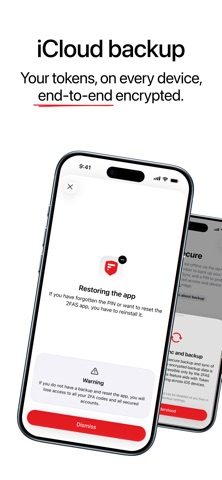
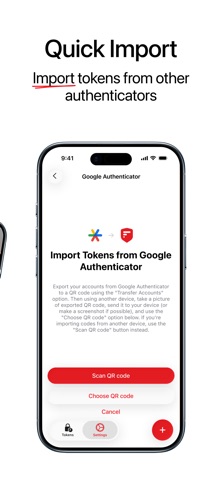
To avoid losing tokens when a phone is lost or broken, you can turn on sync and backup with your own iCloud or Google Drive, or use 2FAS export files. You can organize tokens with groups, badges, icons, and labels, and there is an Apple Watch app.
The 2FAS Auth browser extension for Chrome, Brave, Firefox, Edge, Opera, and Safari removes the need to retype codes. When a site asks for a code, you request it from the extension and confirm on your phone. The phone and browser are paired with a QR code, and all communication between them is end-to-end encrypted.
2FAS Auth is free, and the company says it will stay free; you can donate to support it. The source code for the apps and the browser extension is public on GitHub, and the community helps with translations (16 languages) and support on Discord. The same company also makes 2FAS Pass, a separate local-first password manager.
Best for
Anyone who wants to protect online accounts with two-factor codes using a free, private app that works without an account.
Not for
Teams that need centrally managed MFA with admin controls, and people who want codes stored in a cloud account by default.
Questions and answers
Is 2FAS Auth free?
Yes. 2FAS Auth is 100% free and open source, and the company says it will always be free to use. You can donate to support the project.
Do I need an account?
No. The app does not require an account, email address, or phone number, and use is 100% anonymous.
What happens if I lose my phone?
You can enable secure sync with your own iCloud or Google Drive, or keep 2FAS export files, so you can restore your tokens on a new device.
Which browsers does the extension support?
The 2FAS Auth browser extension works with Chrome, Brave, Firefox, Edge, Opera, and Safari. Communication with the phone is end-to-end encrypted.
Does it work offline?
Yes. 2FAS Auth stores your tokens locally on your device and works offline.